<!doctype html>
<html xmlns="http://www.w3.org/1999/xhtml" xmlns:v="urn:schemas-microsoft-com:vml" xmlns:o="urn:schemas-microsoft-com:office:office" lang="en-US" xml:lang="en-US">
  <head>
    <title data-ignore-plain-text>How to create GIFs with beautiful code animations 🤩</title>
    <meta http-equiv="content-type" content="text/html; charset=utf-8">
    <meta name="viewport" content="width=device-width, initial-scale=1, maximum-scale=1">
    <meta name="format-detection" content="address=no">
    <!--[if (gte mso 9)|(IE)]>
    <style type="text/css" media="screen">
      li {
        text-indent: -1em;
      }
    </style>
    <![endif]-->
    <style type="text/css" media="all">
      body,
.section-text-area,
.section-text-area-wrapper,
.section-text-cell {
    overflow-wrap: break-word;
    word-wrap: break-word;
    -ms-word-break: break-all;
    word-break: break-word;
}
body {
    width: 100% !important;
    min-width: 100% !important;
    -ms-text-size-adjust: none;
    -webkit-text-size-adjust: none;
    mso-line-height-rule: exactly;
}
p {
    margin-block: 0;
}
@media only screen and (max-width:  593px ) {
    table#newsletter-table {
        border: 0 !important;
    }
    table#newsletter-email {
        width: 100% !important;
    }
    img.section-scaleable-image,
    img.section-empty-img {
        max-width: 100% !important;
        height: auto !important;
    }
    .bg-none {
        background: none !important;
    }
    .hauto {
        height: auto !important;
    }
    .show-desktop-only {
        display: none !important;
    }
    .show-mobile-only {
        display: block !important;
        float: none !important;
        line-height: auto !important;
        max-height: inherit !important;
        max-width: inherit !important;
        margin-top: 0px !important;
        overflow: visible !important;
        visibility: inherit !important;
        width: auto !important;
    }
    .stack-cell-wrap {
        display: block !important;
    }
    .stack-cell-up {
        display: table-header-group !important;
    }
    .stack-cell-down {
        display: table-footer-group !important;
    }
    .mw100p {
        max-width: 100% !important;
    }
    .section-horizontal-padding,
    .padding-mobile-both {
        padding-left: 22px !important;
        padding-right: 22px !important;
    }
    .padding-mobile-left {
        padding-left: 22px !important;
    }
    .padding-mobile-right {
        padding-right: 22px !important;
    }
    .text-left {
        text-align: left !important;
    }
    .text-right {
        text-align: right !important;
    }
    .w100p {
        width: 100% !important;
    }
}
.button-style-solid:hover,
.button-style-rounded:hover {
    opacity: .8 !important;
}
a:hover {
    text-decoration: none !important;
}
span.mail-merge-preview {
    border-bottom: 2px dotted currentColor;
    display: inline-block;
    line-height: 1em !important;
    margin-bottom: .125em !important;
}
table#newsletter-section-body .linked-site-title-link {
    color: #0e8ac4 !important;
}
#header-header-section-split-left-0 .brand-name .linked-site-title-link {
    color: #000;
    text-decoration: none;
}
#footer-footer-section-stacked-top-0 .brand-name .linked-site-title-link {
    color: #000;
    text-decoration: none;
}
#footer-footer-section-stacked-top-0 .footer-text .linked-site-title-link {
    color: #0e8ac4;
}
body.renderedPreview #line-line-section-4 div.basic-line[data-line="dashed"] {
    border-width: .5px 0 !important;
}
body.renderedPreview #line-line-section-32 div.basic-line[data-line="dashed"] {
    border-width: .5px 0 !important;
}
body.renderedPreview #line-line-section-34 div.basic-line[data-line="dashed"] {
    border-width: .5px 0 !important;
}

    </style>
    
    
    <!--[if mso]>
    <noscript>
      <xml>
        <o:OfficeDocumentSettings>
          <o:AllowPNG/>
          <o:PixelsPerInch>96</o:PixelsPerInch>
        </o:OfficeDocumentSettings>
      </xml>
    </noscript>
    <![endif]-->
    
    <!--[if (mso)|(mso 16)]>
      <style type="text/css">
        a {text-decoration: none;}
      </style>
    <![endif]-->
  </head>
  <body style="padding:0;margin:0;text-align:center;background-color:#fff;">
    <table role="article" aria-label="How to create GIFs with beautiful code animations 🤩" lang="en-US" cellpadding="0" cellspacing="0" border="0" align="center" id="newsletter-table" style="font-size:16px;font-weight:normal;width:100%;padding:0px;background-color:#fff;border-top:44px solid #fff;border-bottom:44px solid #fff;margin:0 auto;text-align:center;table-layout:fixed;">
  <tbody><tr>
    <td align="center" valign="top" bgcolor="#FFFFFF" id="newsletter-cell" style="font-size:1em;">
      <div data-ignore-plain-text class="newsletter-preview-text" style="color:transparent;display:none !important;height:0;max-height:0;max-width:0;opacity:0;overflow:hidden;mso-hide:all;visibility:hidden;width:0;">
        
            
            Here’s the question I’ve been asked the most: “How do you create these GIFs with the animated code?”͏‌&nbsp;͏‌&nbsp;͏‌&nbsp;͏‌&nbsp;͏‌&nbsp;͏‌&nbsp;͏‌&nbsp;͏‌&nbsp;͏‌&nbsp;͏‌&nbsp;͏‌&nbsp;͏‌&nbsp;͏‌&nbsp;͏‌&nbsp;͏‌&nbsp;͏‌&nbsp;͏‌&nbsp;͏‌&nbsp;͏‌&nbsp;͏‌&nbsp;͏‌&nbsp;͏‌&nbsp;͏‌&nbsp;͏‌&nbsp;͏‌&nbsp;͏‌&nbsp;͏‌&nbsp;͏‌&nbsp;͏‌&nbsp;͏‌&nbsp;͏‌&nbsp;͏‌&nbsp;͏‌&nbsp;͏‌&nbsp;͏‌&nbsp;͏‌&nbsp;͏‌&nbsp;͏‌&nbsp;͏‌&nbsp;͏‌&nbsp;͏‌&nbsp;͏‌&nbsp;͏‌&nbsp;͏‌&nbsp;͏‌&nbsp;͏‌&nbsp;͏‌&nbsp;͏‌&nbsp;͏‌&nbsp;͏‌&nbsp;͏‌&nbsp;͏‌&nbsp;͏‌&nbsp;͏‌&nbsp;͏‌&nbsp;͏‌&nbsp;͏‌&nbsp;͏‌&nbsp;͏‌&nbsp;͏‌&nbsp;͏‌&nbsp;͏‌&nbsp;͏‌&nbsp;͏‌&nbsp;͏‌&nbsp;͏‌&nbsp;͏‌&nbsp;͏‌&nbsp;͏‌&nbsp;͏‌&nbsp;͏‌&nbsp;͏‌&nbsp;͏‌&nbsp;͏‌&nbsp;͏‌&nbsp;͏‌&nbsp;͏‌&nbsp;͏‌&nbsp;͏‌&nbsp;͏‌&nbsp;͏‌&nbsp;͏‌&nbsp;͏‌&nbsp;͏‌&nbsp;͏‌&nbsp;͏‌&nbsp;͏‌&nbsp;͏‌&nbsp;͏‌&nbsp;͏‌&nbsp;͏‌&nbsp;͏‌&nbsp;͏‌&nbsp;͏‌&nbsp;͏‌&nbsp;͏‌&nbsp;͏‌&nbsp;͏‌&nbsp;͏‌&nbsp;͏‌&nbsp;͏‌&nbsp;͏‌&nbsp;͏‌&nbsp;͏‌&nbsp;͏‌&nbsp;͏‌&nbsp;͏‌&nbsp;͏‌&nbsp;͏‌&nbsp;͏‌&nbsp;͏‌&nbsp;͏‌&nbsp;͏‌&nbsp;͏‌&nbsp;͏‌&nbsp;͏‌&nbsp;͏‌&nbsp;͏‌&nbsp;͏‌&nbsp;͏‌&nbsp;͏‌&nbsp;͏‌&nbsp;͏‌&nbsp;͏‌&nbsp;͏‌&nbsp;͏‌&nbsp;͏‌&nbsp;͏‌&nbsp;͏‌&nbsp;͏‌&nbsp;͏‌&nbsp;͏‌&nbsp;͏‌&nbsp;͏‌&nbsp;͏‌&nbsp;͏‌&nbsp;͏‌&nbsp;͏‌&nbsp;͏‌&nbsp;͏‌&nbsp;͏‌&nbsp;͏‌&nbsp;͏‌&nbsp;͏‌&nbsp;͏‌&nbsp;͏‌&nbsp;͏‌&nbsp;͏‌&nbsp;͏‌&nbsp;͏‌&nbsp;͏‌&nbsp;͏‌&nbsp;͏‌&nbsp;͏‌&nbsp;͏‌&nbsp;͏‌&nbsp;͏‌&nbsp;͏‌&nbsp;͏‌&nbsp;͏‌&nbsp;͏‌&nbsp;͏‌&nbsp;͏‌&nbsp;͏‌&nbsp;͏‌&nbsp;͏‌&nbsp;͏‌&nbsp;͏‌&nbsp;͏‌&nbsp;͏‌&nbsp;͏‌&nbsp;͏‌&nbsp;͏‌&nbsp;͏‌&nbsp;͏‌&nbsp;͏‌&nbsp;͏‌&nbsp;͏‌&nbsp;͏‌&nbsp;͏‌&nbsp;͏‌&nbsp;͏‌&nbsp;͏‌&nbsp;͏‌&nbsp;͏‌&nbsp;͏‌&nbsp;͏‌&nbsp;͏‌&nbsp;͏‌&nbsp;͏‌&nbsp;͏‌&nbsp;͏‌&nbsp;͏‌&nbsp;͏‌&nbsp;͏‌&nbsp;͏‌&nbsp;͏‌&nbsp;͏‌&nbsp;͏‌&nbsp;͏‌&nbsp;͏‌&nbsp;͏‌&nbsp;͏‌&nbsp;͏‌&nbsp;͏‌&nbsp;͏‌&nbsp;͏‌&nbsp;͏‌&nbsp;͏‌&nbsp;͏‌&nbsp;͏‌&nbsp;͏‌&nbsp;͏‌&nbsp;͏‌&nbsp;͏‌&nbsp;͏‌&nbsp;͏‌&nbsp;͏‌&nbsp;͏‌&nbsp;͏‌&nbsp;͏‌&nbsp;͏‌&nbsp;͏‌&nbsp;͏‌&nbsp;͏‌&nbsp;͏‌&nbsp;͏‌&nbsp;͏‌&nbsp;͏‌&nbsp;͏‌&nbsp;͏‌&nbsp;͏‌&nbsp;͏‌&nbsp;͏‌&nbsp;͏‌&nbsp;͏‌&nbsp;͏‌&nbsp;͏‌&nbsp;͏‌&nbsp;͏‌&nbsp;͏‌&nbsp;͏‌&nbsp;͏‌&nbsp;͏‌&nbsp;͏‌&nbsp;͏‌&nbsp;͏‌&nbsp;͏‌&nbsp;͏‌&nbsp;͏‌&nbsp;͏‌&nbsp;͏‌&nbsp;͏‌&nbsp;͏‌&nbsp;͏‌&nbsp;
        
      </div>
      <table border="0" cellpadding="0" cellspacing="0" width="594" bgcolor="transparent" id="newsletter-email">
        <tbody><tr>
          <td align="center" valign="top" id="newsletter-email-wrapper" class="book-sans">
            <table role="presentation" width="100%" cellpadding="0" cellspacing="0" border="0" id="newsletter-section-header">
              <tbody><tr>
                <td align="center" valign="middle" id="newsletter-section-header-cell">
                  
<div id="header-header-section-split-left-0">


<table role="presentation" width="100%" cellpadding="0" cellspacing="0" border="0" bgcolor="transparent" class="header-section header-section-split section-content" style="background-color:transparent;">
  <tbody><tr>
    <td class="section-content-cell" style="padding-top:22px;padding-right:22px;padding-bottom:27px;padding-left:22px;">
      <table role="presentation" width="100%" cellpadding="0" cellspacing="0" border="0">
        <tbody><tr>
          <td align="left" valign="middle" width="50%" class="section-text-area">
            
  <p class="brand-name" style="margin:0 0 1.25em 0;font-weight:normal;margin-top:0;margin-bottom:0;font-family:'DejaVu Sans Condensed', 'Liberation Sans', 'Nimbus Sans L', 'Helvetica Neue', Helvetica, Arial, sans-serif;color:#000;font-size:18px;line-height:1em;mso-line-height-alt:18px;white-space:pre-wrap;margin-left:0px;"><strong><a href="https://www.swiftwithvincent.com" rel="nofollow" style="color:#0e8ac4 !important;">Swift with Vincent</a></strong></p>


          </td>
          <td align="right" valign="middle" width="50%" class="section-text-area">
            <p class="email-title" style="line-height:1.618em;margin:0 0 1.25em 0;font-weight:normal;height:1.618em;margin-top:0;margin-bottom:0;font-family:'DejaVu Sans Condensed', 'Liberation Sans', 'Nimbus Sans L', 'Helvetica Neue', Helvetica, Arial, sans-serif;font-size:12px;mso-line-height-alt:12px;color:#000;white-space:pre-wrap;margin-right:0px;"></p>
          </td>
        </tr>
      </tbody></table>
    </td>
  </tr>
</tbody></table>

</div>
                </td>
              </tr>
            </tbody></table>
            <table role="presentation" width="100%" cellpadding="0" cellspacing="0" border="0" id="newsletter-section-body">
              <tbody><tr>
                <td align="center" valign="top" width="100%" id="newsletter-section-body-cell">
                  
<div id="text-text-section-0">


<table role="presentation" width="100%" cellpadding="0" cellspacing="0" border="0" bgcolor="transparent" class="text-section section-content">
  <tbody><tr>
    <td valign="top" class="section-text-area section-content-cell" style="padding-top:10px;padding-right:30px;padding-bottom:10px;padding-left:30px;color:#000;background-color:transparent;">
      <h2 style="color:inherit;margin:1.414em 0 .5em;font-weight:400;line-height:1.25em;font-size:2.8271459439999997em;mso-line-height-alt:2.8271459439999997em;margin-top:0;font-family:'DejaVu Sans Condensed', 'Liberation Sans', 'Nimbus Sans L', 'Helvetica Neue', Helvetica, Arial, sans-serif;letter-spacing:-.01em;text-align:center;">How to create GIFs with beautiful code animations 🤩</h2><p class="" style="color:inherit;font-size:1em;line-height:1.618em;margin:0 0 1.25em 0;font-weight:normal;font-family:'DejaVu Sans Condensed', 'Liberation Sans', 'Nimbus Sans L', 'Helvetica Neue', Helvetica, Arial, sans-serif;">Hi 👋</p><p class="" style="color:inherit;font-size:1em;line-height:1.618em;margin:0 0 1.25em 0;font-weight:normal;font-family:'DejaVu Sans Condensed', 'Liberation Sans', 'Nimbus Sans L', 'Helvetica Neue', Helvetica, Arial, sans-serif;">I’ve been <strong>creating content</strong> focused on <strong>Swift and</strong> <strong>iOS </strong>for a <strong>couple years</strong> and here’s the <strong>question</strong> I’ve been<strong> asked </strong>the<strong> most</strong>:</p><p style="color:inherit;font-size:1em;line-height:1.618em;margin:0 0 1.25em 0;font-weight:normal;font-family:'DejaVu Sans Condensed', 'Liberation Sans', 'Nimbus Sans L', 'Helvetica Neue', Helvetica, Arial, sans-serif;text-align:center;" class=""><em>“How do you create these </em><a href="https://www.swiftwithvincent.com/tips" rel="nofollow" style="color:#0e8ac4 !important;">GIFs with the animated code</a><em>?”</em></p><p class="" style="color:inherit;font-size:1em;line-height:1.618em;margin:0 0 1.25em 0;font-weight:normal;margin-bottom:0;font-family:'DejaVu Sans Condensed', 'Liberation Sans', 'Nimbus Sans L', 'Helvetica Neue', Helvetica, Arial, sans-serif;">I got <strong>asked</strong> this question <strong>so many times</strong> that I’ve actually <strong>written</strong> down the <strong>short</strong> <strong>answer</strong> in the <strong>banner</strong> of both my Twitter and Linked profiles 😅</p>
    </td>
  </tr>
</tbody></table>

</div>
<div id="image-image-section-below-1">
<table role="presentation" width="100%" cellpadding="0" cellspacing="0" border="0" bgcolor="transparent" class="image-section below-layout section-content">


    <tbody><tr>
      <td>
        <table role="presentation" width="100%" cellpadding="0" cellspacing="0" border="0">
          <tbody><tr>
              

            <td align="left" valign="middle" class="section-image-cell section-content-cell section-hoverable-image" data-aspect="ORIGINAL" style="padding:0;">
              
  <a href="https://twitter.com/v_pradeilles/" style="color:#0e8ac4 !important;"><img class="section-scaleable-image" src="https://images.squarespace-cdn.com/content/63139bb1e1a1a078e071f30c/8aa8b43a-9e2c-44a4-ac3e-083df192ae08/Capture+d%E2%80%99%C3%A9cran+2023-03-12+%C3%A0+14.20.08.png?content-type=image%2Fpng&amp;format=750w" width="594" alt="" style="font-size:.7072135785007072em;display:block;border:0;text-decoration:none;line-height:0;background-color:transparent;font-weight:normal;height:auto;width:100%;max-width:100%;font-family:'DejaVu Sans Condensed', 'Liberation Sans', 'Nimbus Sans L', 'Helvetica Neue', Helvetica, Arial, sans-serif;"></a>


            </td>
              

          </tr>
        </tbody></table>
      </td>
    </tr>


</tbody></table>

</div>
<div id="text-text-section-2">


<table role="presentation" width="100%" cellpadding="0" cellspacing="0" border="0" bgcolor="transparent" class="text-section section-content">
  <tbody><tr>
    <td valign="top" class="section-text-area section-content-cell padding-mobile-both" style="padding-top:11px;padding-right:44px;padding-bottom:11px;padding-left:44px;color:#313131;background-color:transparent;">
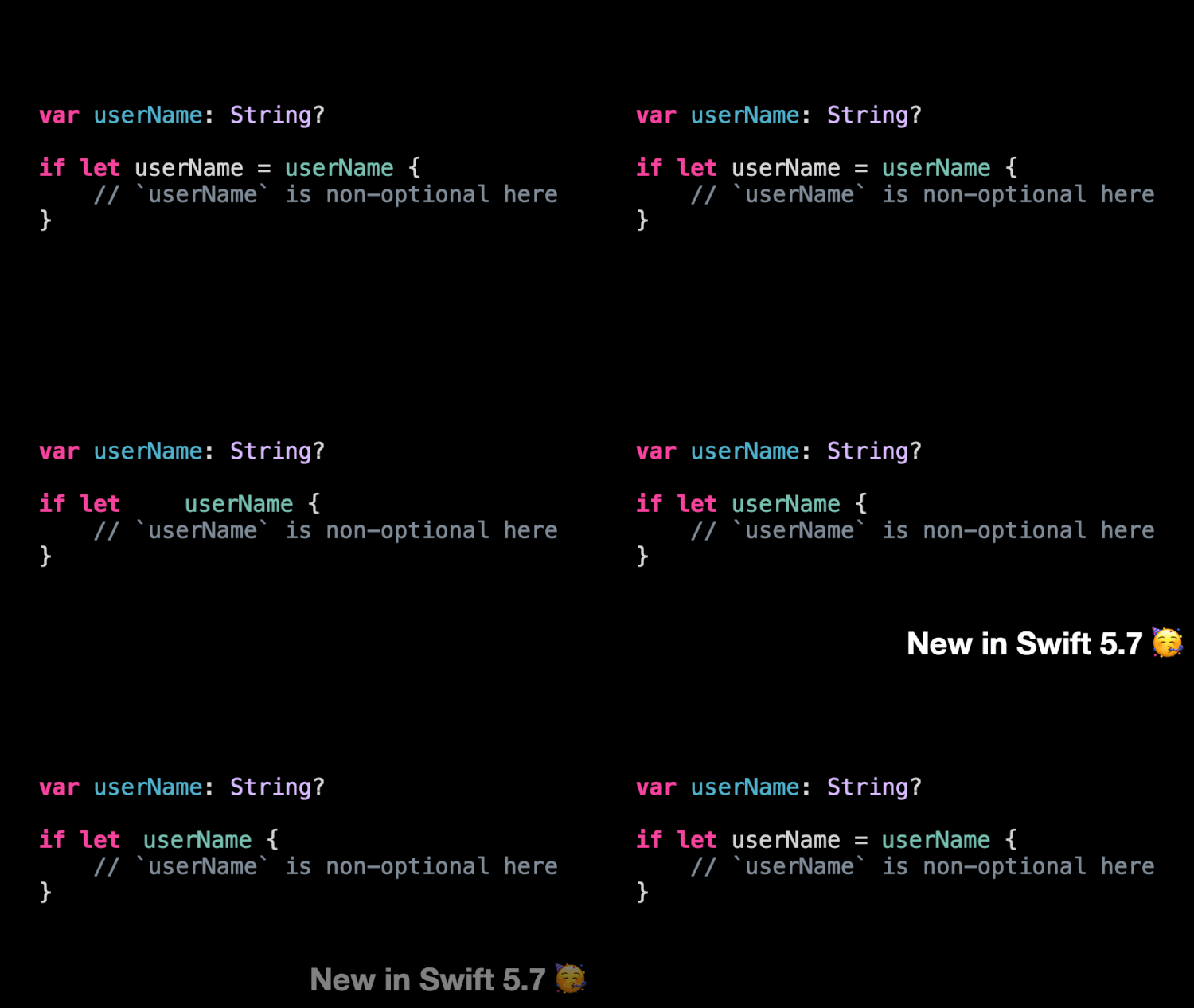
      <p class="" style="color:inherit;font-size:1em;line-height:1.618em;margin:0 0 1.25em 0;font-weight:normal;margin-top:0;margin-bottom:0;font-family:'DejaVu Sans Condensed', 'Liberation Sans', 'Nimbus Sans L', 'Helvetica Neue', Helvetica, Arial, sans-serif;">And in this email I’m going to <strong>walk you</strong> in details<strong> through</strong> all the  <strong>steps </strong>to <strong>create</strong> a <strong>nice animation </strong>like this one:</p>
    </td>
  </tr>
</tbody></table>

</div>
<div id="image-image-section-below-3">
<table role="presentation" width="100%" cellpadding="0" cellspacing="0" border="0" bgcolor="transparent" class="image-section below-layout section-content">


    <tbody><tr>
      <td>
        <table role="presentation" width="100%" cellpadding="0" cellspacing="0" border="0">
          <tbody><tr>
              

            <td align="left" valign="middle" class="section-image-cell section-content-cell section-hoverable-image" data-aspect="ORIGINAL" style="padding:0;">
              
  <img class="section-scaleable-image" src="https://images.squarespace-cdn.com/content/63139bb1e1a1a078e071f30c/9e2aa688-f897-491c-9b2b-7ac411d95d0d/if-let.gif?content-type=image%2Fgif&amp;format=750w" width="594" alt="" style="font-size:.7072135785007072em;display:block;border:0;text-decoration:none;line-height:0;background-color:transparent;font-weight:normal;height:auto;width:100%;max-width:100%;font-family:'DejaVu Sans Condensed', 'Liberation Sans', 'Nimbus Sans L', 'Helvetica Neue', Helvetica, Arial, sans-serif;">


            </td>
              

          </tr>
        </tbody></table>
      </td>
    </tr>


</tbody></table>

</div>
<div id="line-line-section-4">

<table role="presentation" width="100%" cellpadding="0" cellspacing="0" border="0" bgcolor="transparent" class="line-section section-content">
  <tbody><tr>
    <td align="center" valign="middle" width="100%">
      <table role="presentation" width="100%" cellpadding="0" cellspacing="0" border="0" class="line-section-table section-content" style="width:40%;min-width:40%;">
        <tbody><tr>
          <td align="center" valign="middle" class="section-content-cell" width="100%" style="padding-top:33px;padding-right:0;padding-bottom:22px;padding-left:0;">
            <div class="basic-line" data-line="solid" style="background:none;font-size:0;margin:0;line-height:0;height:0;width:100%;border-style:solid none;border-width:1px 0 0px;border-color:#000;">&nbsp;</div>
          </td>
        </tr>
      </tbody></table>
    </td>
  </tr>
</tbody></table>

</div>
<div id="text-text-section-5">


<table role="presentation" width="100%" cellpadding="0" cellspacing="0" border="0" bgcolor="transparent" class="text-section section-content">
  <tbody><tr>
    <td valign="top" class="section-text-area section-content-cell padding-mobile-both" style="padding-top:11px;padding-right:44px;padding-bottom:11px;padding-left:44px;color:#313131;background-color:transparent;">
      <p class="" style="color:inherit;font-size:1em;line-height:1.618em;margin:0 0 1.25em 0;font-weight:normal;margin-top:0;margin-bottom:0;font-family:'DejaVu Sans Condensed', 'Liberation Sans', 'Nimbus Sans L', 'Helvetica Neue', Helvetica, Arial, sans-serif;">First, open <strong>Xcode</strong>, go to the <strong>Preferences</strong> and open the <strong>Theme</strong> tab:</p>
    </td>
  </tr>
</tbody></table>

</div>
<div id="image-image-section-below-6">
<table role="presentation" width="100%" cellpadding="0" cellspacing="0" border="0" bgcolor="transparent" class="image-section below-layout section-content">


    <tbody><tr>
      <td>
        <table role="presentation" width="100%" cellpadding="0" cellspacing="0" border="0">
          <tbody><tr>
              

            <td align="left" valign="middle" class="section-image-cell section-content-cell section-hoverable-image" data-aspect="ORIGINAL" style="padding:0;">
              
  <img class="section-scaleable-image" src="https://images.squarespace-cdn.com/content/63139bb1e1a1a078e071f30c/7090af9e-7ea1-4fd9-887b-39401768ef70/Screenshot+2023-03-12+at+14.36.36.png?content-type=image%2Fpng&amp;format=750w" width="594" alt="" style="font-size:.7072135785007072em;display:block;border:0;text-decoration:none;line-height:0;background-color:transparent;font-weight:normal;height:auto;width:100%;max-width:100%;font-family:'DejaVu Sans Condensed', 'Liberation Sans', 'Nimbus Sans L', 'Helvetica Neue', Helvetica, Arial, sans-serif;">


            </td>
              

          </tr>
        </tbody></table>
      </td>
    </tr>


</tbody></table>

</div>
<div id="text-text-section-7">


<table role="presentation" width="100%" cellpadding="0" cellspacing="0" border="0" bgcolor="transparent" class="text-section section-content">
  <tbody><tr>
    <td valign="top" class="section-text-area section-content-cell padding-mobile-both" style="padding-top:11px;padding-right:44px;padding-bottom:11px;padding-left:44px;color:#313131;background-color:transparent;">
      <p class="" style="color:inherit;font-size:1em;line-height:1.618em;margin:0 0 1.25em 0;font-weight:normal;margin-top:0;font-family:'DejaVu Sans Condensed', 'Liberation Sans', 'Nimbus Sans L', 'Helvetica Neue', Helvetica, Arial, sans-serif;">As you can see, I’ve selected the theme <strong>Presentation (Dark)</strong>.</p><p class="" style="color:inherit;font-size:1em;line-height:1.618em;margin:0 0 1.25em 0;font-weight:normal;margin-bottom:0;font-family:'DejaVu Sans Condensed', 'Liberation Sans', 'Nimbus Sans L', 'Helvetica Neue', Helvetica, Arial, sans-serif;">But I’ve made one <strong>important change</strong>: I <strong>updated</strong> the <strong>Background</strong> color to be <strong>pure black</strong>:</p>
    </td>
  </tr>
</tbody></table>

</div>
<div id="image-image-section-below-8">
<table role="presentation" width="100%" cellpadding="0" cellspacing="0" border="0" bgcolor="transparent" class="image-section below-layout section-content">


    <tbody><tr>
      <td>
        <table role="presentation" width="100%" cellpadding="0" cellspacing="0" border="0">
          <tbody><tr>
              

            <td align="left" valign="middle" class="section-image-cell section-content-cell section-hoverable-image" data-aspect="ORIGINAL" style="padding:0;">
              
  <img class="section-scaleable-image" src="https://images.squarespace-cdn.com/content/63139bb1e1a1a078e071f30c/44b0e160-f099-41e5-9958-191abf70dc08/Screenshot+2023-03-12+at+14.37.36.png?content-type=image%2Fpng&amp;format=750w" width="594" alt="" style="font-size:.7072135785007072em;display:block;border:0;text-decoration:none;line-height:0;background-color:transparent;font-weight:normal;height:auto;width:100%;max-width:100%;font-family:'DejaVu Sans Condensed', 'Liberation Sans', 'Nimbus Sans L', 'Helvetica Neue', Helvetica, Arial, sans-serif;">


            </td>
              

          </tr>
        </tbody></table>
      </td>
    </tr>


</tbody></table>

</div>
<div id="text-text-section-9">


<table role="presentation" width="100%" cellpadding="0" cellspacing="0" border="0" bgcolor="transparent" class="text-section section-content">
  <tbody><tr>
    <td valign="top" class="section-text-area section-content-cell padding-mobile-both" style="padding-top:11px;padding-right:44px;padding-bottom:11px;padding-left:44px;color:#313131;background-color:transparent;">
      <p class="" style="color:inherit;font-size:1em;line-height:1.618em;margin:0 0 1.25em 0;font-weight:normal;margin-top:0;margin-bottom:0;font-family:'DejaVu Sans Condensed', 'Liberation Sans', 'Nimbus Sans L', 'Helvetica Neue', Helvetica, Arial, sans-serif;">With that done, the next step is to <strong>write the code</strong> we want to animate:</p>
    </td>
  </tr>
</tbody></table>

</div>
<div id="image-image-section-below-10">
<table role="presentation" width="100%" cellpadding="0" cellspacing="0" border="0" bgcolor="transparent" class="image-section below-layout section-content">


    <tbody><tr>
      <td>
        <table role="presentation" width="100%" cellpadding="0" cellspacing="0" border="0">
          <tbody><tr>
              

            <td align="left" valign="middle" class="section-image-cell section-content-cell section-hoverable-image" data-aspect="ORIGINAL" style="padding:0;">
              
  <img class="section-scaleable-image" src="https://images.squarespace-cdn.com/content/63139bb1e1a1a078e071f30c/be158ac6-3058-41c5-8a9d-eadb999f80e9/Screenshot+2023-03-12+at+14.40.43.png?content-type=image%2Fpng&amp;format=750w" width="594" alt="" style="font-size:.7072135785007072em;display:block;border:0;text-decoration:none;line-height:0;background-color:transparent;font-weight:normal;height:auto;width:100%;max-width:100%;font-family:'DejaVu Sans Condensed', 'Liberation Sans', 'Nimbus Sans L', 'Helvetica Neue', Helvetica, Arial, sans-serif;">


            </td>
              

          </tr>
        </tbody></table>
      </td>
    </tr>


</tbody></table>

</div>
<div id="text-text-section-11">


<table role="presentation" width="100%" cellpadding="0" cellspacing="0" border="0" bgcolor="transparent" class="text-section section-content">
  <tbody><tr>
    <td valign="top" class="section-text-area section-content-cell padding-mobile-both" style="padding-top:11px;padding-right:44px;padding-bottom:11px;padding-left:44px;color:#313131;background-color:transparent;">
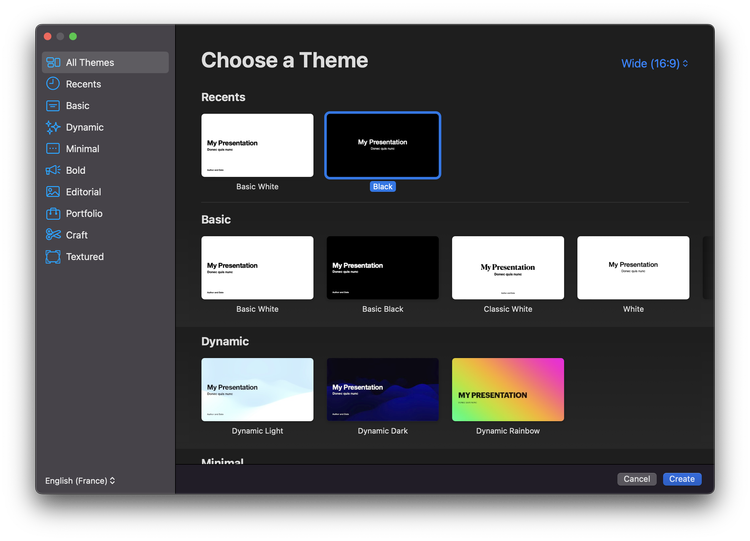
      <p class="" style="color:inherit;font-size:1em;line-height:1.618em;margin:0 0 1.25em 0;font-weight:normal;margin-top:0;font-family:'DejaVu Sans Condensed', 'Liberation Sans', 'Nimbus Sans L', 'Helvetica Neue', Helvetica, Arial, sans-serif;">After that, it’s time to <strong>open Keynote</strong> and <strong>create</strong> a <strong>new document</strong>.</p><p class="" style="color:inherit;font-size:1em;line-height:1.618em;margin:0 0 1.25em 0;font-weight:normal;margin-bottom:0;font-family:'DejaVu Sans Condensed', 'Liberation Sans', 'Nimbus Sans L', 'Helvetica Neue', Helvetica, Arial, sans-serif;">Choose the <strong>Black theme</strong>, add a <strong>Blank slide</strong> and <strong>delete</strong> the title slide.</p>
    </td>
  </tr>
</tbody></table>

</div>
<div id="image-image-section-below-12">
<table role="presentation" width="100%" cellpadding="0" cellspacing="0" border="0" bgcolor="transparent" class="image-section below-layout section-content">


    <tbody><tr>
      <td>
        <table role="presentation" width="100%" cellpadding="0" cellspacing="0" border="0">
          <tbody><tr>
              

            <td align="left" valign="middle" class="section-image-cell section-content-cell section-hoverable-image" data-aspect="ORIGINAL" style="padding:0;">
              
  <img class="section-scaleable-image" src="https://images.squarespace-cdn.com/content/63139bb1e1a1a078e071f30c/3f5b2f00-156e-42cf-a338-2b2d6fb200eb/Screenshot+2023-03-12+at+14.41.45.png?content-type=image%2Fpng&amp;format=750w" width="594" alt="" style="font-size:.7072135785007072em;display:block;border:0;text-decoration:none;line-height:0;background-color:transparent;font-weight:normal;height:auto;width:100%;max-width:100%;font-family:'DejaVu Sans Condensed', 'Liberation Sans', 'Nimbus Sans L', 'Helvetica Neue', Helvetica, Arial, sans-serif;">


            </td>
              

          </tr>
        </tbody></table>
      </td>
    </tr>


    <tr>
      <td>
        <table role="presentation" width="100%" cellpadding="0" cellspacing="0" border="0">
          <tbody><tr>
              

            <td align="left" valign="middle" class="section-image-cell section-content-cell section-hoverable-image" data-aspect="ORIGINAL" style="padding:0;">
              
  <img class="section-scaleable-image" src="https://images.squarespace-cdn.com/content/63139bb1e1a1a078e071f30c/b0830983-796c-47c1-9b3a-d2762b9f0e1c/Screenshot+2023-03-12+at+14.42.10.png?content-type=image%2Fpng&amp;format=750w" width="594" alt="" style="font-size:.7072135785007072em;display:block;border:0;text-decoration:none;line-height:0;background-color:transparent;font-weight:normal;height:auto;width:100%;max-width:100%;font-family:'DejaVu Sans Condensed', 'Liberation Sans', 'Nimbus Sans L', 'Helvetica Neue', Helvetica, Arial, sans-serif;">


            </td>
              

          </tr>
        </tbody></table>
      </td>
    </tr>


</tbody></table>

</div>
<div id="text-text-section-13">


<table role="presentation" width="100%" cellpadding="0" cellspacing="0" border="0" bgcolor="transparent" class="text-section section-content">
  <tbody><tr>
    <td valign="top" class="section-text-area section-content-cell padding-mobile-both" style="padding-top:11px;padding-right:44px;padding-bottom:11px;padding-left:44px;color:#313131;background-color:transparent;">
      <p class="" style="color:inherit;font-size:1em;line-height:1.618em;margin:0 0 1.25em 0;font-weight:normal;margin-top:0;margin-bottom:0;font-family:'DejaVu Sans Condensed', 'Liberation Sans', 'Nimbus Sans L', 'Helvetica Neue', Helvetica, Arial, sans-serif;">Then go <strong>back to Xcode</strong>, <strong>select</strong> the <strong>code</strong> and <strong>copy</strong> it to the pasteboard:</p>
    </td>
  </tr>
</tbody></table>

</div>
<div id="image-image-section-below-14">
<table role="presentation" width="100%" cellpadding="0" cellspacing="0" border="0" bgcolor="transparent" class="image-section below-layout section-content">


    <tbody><tr>
      <td>
        <table role="presentation" width="100%" cellpadding="0" cellspacing="0" border="0">
          <tbody><tr>
              

            <td align="left" valign="middle" class="section-image-cell section-content-cell section-hoverable-image" data-aspect="ORIGINAL" style="padding:0;">
              
  <img class="section-scaleable-image" src="https://images.squarespace-cdn.com/content/63139bb1e1a1a078e071f30c/e098766d-c9f0-4d62-896c-a645adcc7fd0/Screenshot+2023-03-12+at+14.51.38.png?content-type=image%2Fpng&amp;format=750w" width="594" alt="" style="font-size:.7072135785007072em;display:block;border:0;text-decoration:none;line-height:0;background-color:transparent;font-weight:normal;height:auto;width:100%;max-width:100%;font-family:'DejaVu Sans Condensed', 'Liberation Sans', 'Nimbus Sans L', 'Helvetica Neue', Helvetica, Arial, sans-serif;">


            </td>
              

          </tr>
        </tbody></table>
      </td>
    </tr>


</tbody></table>

</div>
<div id="text-text-section-15">


<table role="presentation" width="100%" cellpadding="0" cellspacing="0" border="0" bgcolor="transparent" class="text-section section-content">
  <tbody><tr>
    <td valign="top" class="section-text-area section-content-cell padding-mobile-both" style="padding-top:11px;padding-right:44px;padding-bottom:11px;padding-left:44px;color:#313131;background-color:transparent;">
      <p class="" style="color:inherit;font-size:1em;line-height:1.618em;margin:0 0 1.25em 0;font-weight:normal;margin-top:0;font-family:'DejaVu Sans Condensed', 'Liberation Sans', 'Nimbus Sans L', 'Helvetica Neue', Helvetica, Arial, sans-serif;">Now <strong>switch back</strong> to <strong>Keynote</strong> and <strong>paste</strong> the code. </p><p class="" style="color:inherit;font-size:1em;line-height:1.618em;margin:0 0 1.25em 0;font-weight:normal;margin-bottom:0;font-family:'DejaVu Sans Condensed', 'Liberation Sans', 'Nimbus Sans L', 'Helvetica Neue', Helvetica, Arial, sans-serif;">You’ll <strong>notice</strong> that both the <strong>formatting</strong> and <strong>syntax coloring</strong> have been <strong>preserved</strong> 🤩</p>
    </td>
  </tr>
</tbody></table>

</div>
<div id="image-image-section-below-16">
<table role="presentation" width="100%" cellpadding="0" cellspacing="0" border="0" bgcolor="transparent" class="image-section below-layout section-content">


    <tbody><tr>
      <td>
        <table role="presentation" width="100%" cellpadding="0" cellspacing="0" border="0">
          <tbody><tr>
              

            <td align="left" valign="middle" class="section-image-cell section-content-cell section-hoverable-image" data-aspect="ORIGINAL" style="padding:0;">
              
  <img class="section-scaleable-image" src="https://images.squarespace-cdn.com/content/63139bb1e1a1a078e071f30c/a399cfb8-c004-4e0c-8247-37810ddf09bc/Screenshot+2023-03-12+at+14.51.43.png?content-type=image%2Fpng&amp;format=750w" width="594" alt="" style="font-size:.7072135785007072em;display:block;border:0;text-decoration:none;line-height:0;background-color:transparent;font-weight:normal;height:auto;width:100%;max-width:100%;font-family:'DejaVu Sans Condensed', 'Liberation Sans', 'Nimbus Sans L', 'Helvetica Neue', Helvetica, Arial, sans-serif;">


            </td>
              

          </tr>
        </tbody></table>
      </td>
    </tr>


</tbody></table>

</div>
<div id="text-text-section-17">


<table role="presentation" width="100%" cellpadding="0" cellspacing="0" border="0" bgcolor="transparent" class="text-section section-content">
  <tbody><tr>
    <td valign="top" class="section-text-area section-content-cell padding-mobile-both" style="padding-top:11px;padding-right:44px;padding-bottom:11px;padding-left:44px;color:#313131;background-color:transparent;">
      <p class="" style="color:inherit;font-size:1em;line-height:1.618em;margin:0 0 1.25em 0;font-weight:normal;margin-top:0;margin-bottom:0;font-family:'DejaVu Sans Condensed', 'Liberation Sans', 'Nimbus Sans L', 'Helvetica Neue', Helvetica, Arial, sans-serif;">Obviously, we need to <strong>make</strong> the <strong>code</strong> a <strong>little bit bigger</strong>: <em>74pt</em> is a <strong>good size</strong> for that amount of code:</p>
    </td>
  </tr>
</tbody></table>

</div>
<div id="image-image-section-below-18">
<table role="presentation" width="100%" cellpadding="0" cellspacing="0" border="0" bgcolor="transparent" class="image-section below-layout section-content">


    <tbody><tr>
      <td>
        <table role="presentation" width="100%" cellpadding="0" cellspacing="0" border="0">
          <tbody><tr>
              

            <td align="left" valign="middle" class="section-image-cell section-content-cell section-hoverable-image" data-aspect="ORIGINAL" style="padding:0;">
              
  <img class="section-scaleable-image" src="https://images.squarespace-cdn.com/content/63139bb1e1a1a078e071f30c/ebab659a-ac6a-4f11-9ad3-4dff07b0f075/Screenshot+2023-03-12+at+14.52.34.png?content-type=image%2Fpng&amp;format=750w" width="594" alt="" style="font-size:.7072135785007072em;display:block;border:0;text-decoration:none;line-height:0;background-color:transparent;font-weight:normal;height:auto;width:100%;max-width:100%;font-family:'DejaVu Sans Condensed', 'Liberation Sans', 'Nimbus Sans L', 'Helvetica Neue', Helvetica, Arial, sans-serif;">


            </td>
              

          </tr>
        </tbody></table>
      </td>
    </tr>


</tbody></table>

</div>
<div id="text-text-section-19">


<table role="presentation" width="100%" cellpadding="0" cellspacing="0" border="0" bgcolor="transparent" class="text-section section-content">
  <tbody><tr>
    <td valign="top" class="section-text-area section-content-cell padding-mobile-both" style="padding-top:11px;padding-right:44px;padding-bottom:11px;padding-left:44px;color:#313131;background-color:transparent;">
      <p class="" style="color:inherit;font-size:1em;line-height:1.618em;margin:0 0 1.25em 0;font-weight:normal;margin-top:0;font-family:'DejaVu Sans Condensed', 'Liberation Sans', 'Nimbus Sans L', 'Helvetica Neue', Helvetica, Arial, sans-serif;">We now have <strong>everything</strong> we <strong>need</strong> to <strong>create</strong> our <strong>animation</strong> 🔥</p><p class="" style="color:inherit;font-size:1em;line-height:1.618em;margin:0 0 1.25em 0;font-weight:normal;margin-bottom:0;font-family:'DejaVu Sans Condensed', 'Liberation Sans', 'Nimbus Sans L', 'Helvetica Neue', Helvetica, Arial, sans-serif;">First, <strong>duplicate</strong> the <strong>slide</strong> and <strong>update</strong> the <strong>code</strong> in the <strong>new slide</strong>:</p>
    </td>
  </tr>
</tbody></table>

</div>
<div id="image-image-section-below-20">
<table role="presentation" width="100%" cellpadding="0" cellspacing="0" border="0" bgcolor="transparent" class="image-section below-layout section-content">


    <tbody><tr>
      <td>
        <table role="presentation" width="100%" cellpadding="0" cellspacing="0" border="0">
          <tbody><tr>
              

            <td align="left" valign="middle" class="section-image-cell section-content-cell section-hoverable-image" data-aspect="ORIGINAL" style="padding:0;">
              
  <img class="section-scaleable-image" src="https://images.squarespace-cdn.com/content/63139bb1e1a1a078e071f30c/26d068fc-e6c9-4632-a5a5-2d912abe4576/Screenshot+2023-03-12+at+14.55.06.png?content-type=image%2Fpng&amp;format=750w" width="594" alt="" style="font-size:.7072135785007072em;display:block;border:0;text-decoration:none;line-height:0;background-color:transparent;font-weight:normal;height:auto;width:100%;max-width:100%;font-family:'DejaVu Sans Condensed', 'Liberation Sans', 'Nimbus Sans L', 'Helvetica Neue', Helvetica, Arial, sans-serif;">


            </td>
              

          </tr>
        </tbody></table>
      </td>
    </tr>


</tbody></table>

</div>
<div id="text-text-section-21">


<table role="presentation" width="100%" cellpadding="0" cellspacing="0" border="0" bgcolor="transparent" class="text-section section-content">
  <tbody><tr>
    <td valign="top" class="section-text-area section-content-cell padding-mobile-both" style="padding-top:11px;padding-right:44px;padding-bottom:11px;padding-left:44px;color:#313131;background-color:transparent;">
      <p class="" style="color:inherit;font-size:1em;line-height:1.618em;margin:0 0 1.25em 0;font-weight:normal;margin-top:0;font-family:'DejaVu Sans Condensed', 'Liberation Sans', 'Nimbus Sans L', 'Helvetica Neue', Helvetica, Arial, sans-serif;">Here the <strong>change</strong> is <strong>simple</strong>: we just need to <strong>remove some code</strong>, so we can make that <strong>change</strong> <strong>directly</strong> in <strong>Keynote</strong>. </p><p class="" style="color:inherit;font-size:1em;line-height:1.618em;margin:0 0 1.25em 0;font-weight:normal;font-family:'DejaVu Sans Condensed', 'Liberation Sans', 'Nimbus Sans L', 'Helvetica Neue', Helvetica, Arial, sans-serif;">Of course, for <strong>more complex changes</strong>, we would <strong>update</strong> the <strong>code</strong> in <strong>Xcode</strong> and then <strong>copy/paste </strong>back to <strong>Keynote</strong> 👌</p><p class="" style="color:inherit;font-size:1em;line-height:1.618em;margin:0 0 1.25em 0;font-weight:normal;margin-bottom:0;font-family:'DejaVu Sans Condensed', 'Liberation Sans', 'Nimbus Sans L', 'Helvetica Neue', Helvetica, Arial, sans-serif;">After that, we add the text “<em>New in Swift 5.7</em><strong> </strong>🥳”:</p>
    </td>
  </tr>
</tbody></table>

</div>
<div id="image-image-section-below-22">
<table role="presentation" width="100%" cellpadding="0" cellspacing="0" border="0" bgcolor="transparent" class="image-section below-layout section-content">


    <tbody><tr>
      <td>
        <table role="presentation" width="100%" cellpadding="0" cellspacing="0" border="0">
          <tbody><tr>
              

            <td align="left" valign="middle" class="section-image-cell section-content-cell section-hoverable-image" data-aspect="ORIGINAL" style="padding:0;">
              
  <img class="section-scaleable-image" src="https://images.squarespace-cdn.com/content/63139bb1e1a1a078e071f30c/f112f0c4-6475-4174-9303-cbffd6834e65/Screenshot+2023-03-12+at+14.58.34.png?content-type=image%2Fpng&amp;format=750w" width="594" alt="" style="font-size:.7072135785007072em;display:block;border:0;text-decoration:none;line-height:0;background-color:transparent;font-weight:normal;height:auto;width:100%;max-width:100%;font-family:'DejaVu Sans Condensed', 'Liberation Sans', 'Nimbus Sans L', 'Helvetica Neue', Helvetica, Arial, sans-serif;">


            </td>
              

          </tr>
        </tbody></table>
      </td>
    </tr>


</tbody></table>

</div>
<div id="text-text-section-23">


<table role="presentation" width="100%" cellpadding="0" cellspacing="0" border="0" bgcolor="transparent" class="text-section section-content">
  <tbody><tr>
    <td valign="top" class="section-text-area section-content-cell padding-mobile-both" style="padding-top:11px;padding-right:44px;padding-bottom:11px;padding-left:44px;color:#313131;background-color:transparent;">
      <p class="" style="color:inherit;font-size:1em;line-height:1.618em;margin:0 0 1.25em 0;font-weight:normal;margin-top:0;font-family:'DejaVu Sans Condensed', 'Liberation Sans', 'Nimbus Sans L', 'Helvetica Neue', Helvetica, Arial, sans-serif;">Now it’s time we actually <strong>implement </strong>the<strong> animation 🪄</strong></p><p class="" style="color:inherit;font-size:1em;line-height:1.618em;margin:0 0 1.25em 0;font-weight:normal;margin-bottom:0;font-family:'DejaVu Sans Condensed', 'Liberation Sans', 'Nimbus Sans L', 'Helvetica Neue', Helvetica, Arial, sans-serif;">For that, <strong>select </strong>both<strong> slides</strong>, go to the <strong>Animate</strong> inspector and <strong>add</strong> a <strong>Magic Move </strong>transition:</p>
    </td>
  </tr>
</tbody></table>

</div>
<div id="image-image-section-below-24">
<table role="presentation" width="100%" cellpadding="0" cellspacing="0" border="0" bgcolor="transparent" class="image-section below-layout section-content">


    <tbody><tr>
      <td>
        <table role="presentation" width="100%" cellpadding="0" cellspacing="0" border="0">
          <tbody><tr>
              

            <td align="left" valign="middle" class="section-image-cell section-content-cell section-hoverable-image" data-aspect="ORIGINAL" style="padding:0;">
              
  <img class="section-scaleable-image" src="https://images.squarespace-cdn.com/content/63139bb1e1a1a078e071f30c/cdb61aab-6df4-44cc-976f-17743d5ca82b/Screenshot+2023-03-12+at+15.00.55.png?content-type=image%2Fpng&amp;format=750w" width="594" alt="" style="font-size:.7072135785007072em;display:block;border:0;text-decoration:none;line-height:0;background-color:transparent;font-weight:normal;height:auto;width:100%;max-width:100%;font-family:'DejaVu Sans Condensed', 'Liberation Sans', 'Nimbus Sans L', 'Helvetica Neue', Helvetica, Arial, sans-serif;">


            </td>
              

          </tr>
        </tbody></table>
      </td>
    </tr>


</tbody></table>

</div>
<div id="text-text-section-25">


<table role="presentation" width="100%" cellpadding="0" cellspacing="0" border="0" bgcolor="transparent" class="text-section section-content">
  <tbody><tr>
    <td valign="top" class="section-text-area section-content-cell padding-mobile-both" style="padding-top:11px;padding-right:44px;padding-bottom:11px;padding-left:44px;color:#313131;background-color:transparent;">
      <p class="" style="color:inherit;font-size:1em;line-height:1.618em;margin:0 0 1.25em 0;font-weight:normal;margin-top:0;font-family:'DejaVu Sans Condensed', 'Liberation Sans', 'Nimbus Sans L', 'Helvetica Neue', Helvetica, Arial, sans-serif;">Make sure to <strong>select</strong> the <strong>Match </strong>option “<em>By Word</em>”: it will <strong>make</strong> <strong>Keynote</strong> automatically <strong>animate</strong> the <strong>changes</strong> <strong>between</strong> the <strong>two</strong> <strong>slides</strong> at the <strong>word</strong> <strong>level</strong>.</p><p class="" style="color:inherit;font-size:1em;line-height:1.618em;margin:0 0 1.25em 0;font-weight:normal;margin-bottom:0;font-family:'DejaVu Sans Condensed', 'Liberation Sans', 'Nimbus Sans L', 'Helvetica Neue', Helvetica, Arial, sans-serif;">I would also recommend <strong>lowering</strong> the <strong>duration</strong> of the <strong>transition</strong> to “<em>1s</em>”, for a more <strong>dynamic</strong> feeling.</p>
    </td>
  </tr>
</tbody></table>

</div>
<div id="image-image-section-below-26">
<table role="presentation" width="100%" cellpadding="0" cellspacing="0" border="0" bgcolor="transparent" class="image-section below-layout section-content">


    <tbody><tr>
      <td>
        <table role="presentation" width="100%" cellpadding="0" cellspacing="0" border="0">
          <tbody><tr>
              

            <td align="left" valign="middle" class="section-image-cell section-content-cell section-hoverable-image" data-aspect="ORIGINAL" style="padding:0;">
              
  <img class="section-scaleable-image" src="https://images.squarespace-cdn.com/content/63139bb1e1a1a078e071f30c/25f3ea10-35e9-4f59-8e5d-358477416b74/Screenshot+2023-03-12+at+15.01.37.png?content-type=image%2Fpng&amp;format=750w" width="594" alt="" style="font-size:.7072135785007072em;display:block;border:0;text-decoration:none;line-height:0;background-color:transparent;font-weight:normal;height:auto;width:100%;max-width:100%;font-family:'DejaVu Sans Condensed', 'Liberation Sans', 'Nimbus Sans L', 'Helvetica Neue', Helvetica, Arial, sans-serif;">


            </td>
              

          </tr>
        </tbody></table>
      </td>
    </tr>


</tbody></table>

</div>
<div id="text-text-section-27">


<table role="presentation" width="100%" cellpadding="0" cellspacing="0" border="0" bgcolor="transparent" class="text-section section-content">
  <tbody><tr>
    <td valign="top" class="section-text-area section-content-cell padding-mobile-both" style="padding-top:11px;padding-right:44px;padding-bottom:22px;padding-left:44px;color:#313131;background-color:transparent;">
      <p class="" style="color:inherit;font-size:1em;line-height:1.618em;margin:0 0 1.25em 0;font-weight:normal;margin-top:0;font-family:'DejaVu Sans Condensed', 'Liberation Sans', 'Nimbus Sans L', 'Helvetica Neue', Helvetica, Arial, sans-serif;">You can click on <em>Preview</em> to <strong>check</strong> how the <strong>animation</strong> will <strong>look like</strong>!</p><p class="" style="color:inherit;font-size:1em;line-height:1.618em;margin:0 0 1.25em 0;font-weight:normal;font-family:'DejaVu Sans Condensed', 'Liberation Sans', 'Nimbus Sans L', 'Helvetica Neue', Helvetica, Arial, sans-serif;">Finally, last step: we need to <strong>export</strong> our <strong>animation</strong> 🎞️</p><p class="" style="color:inherit;font-size:1em;line-height:1.618em;margin:0 0 1.25em 0;font-weight:normal;margin-bottom:0;font-family:'DejaVu Sans Condensed', 'Liberation Sans', 'Nimbus Sans L', 'Helvetica Neue', Helvetica, Arial, sans-serif;">To <strong>export</strong> as a <strong>GIF</strong>, go to <em>File</em>, <em>Export To</em> and <em>Animated GIF…</em></p>
    </td>
  </tr>
</tbody></table>

</div>
<div id="image-image-section-below-28">
<table role="presentation" width="100%" cellpadding="0" cellspacing="0" border="0" bgcolor="transparent" class="image-section below-layout section-content">


    <tbody><tr>
      <td>
        <table role="presentation" width="100%" cellpadding="0" cellspacing="0" border="0">
          <tbody><tr>
              

            <td align="left" valign="middle" class="section-image-cell section-content-cell section-hoverable-image" data-aspect="ORIGINAL" style="padding:0;">
              
  <img class="section-scaleable-image" src="https://images.squarespace-cdn.com/content/63139bb1e1a1a078e071f30c/d7f52457-898c-4e46-bec2-f8e561bc9e27/Screenshot+2023-03-12+at+15.09.12.png?content-type=image%2Fpng&amp;format=750w" width="594" alt="" style="font-size:.7072135785007072em;display:block;border:0;text-decoration:none;line-height:0;background-color:transparent;font-weight:normal;height:auto;width:100%;max-width:100%;font-family:'DejaVu Sans Condensed', 'Liberation Sans', 'Nimbus Sans L', 'Helvetica Neue', Helvetica, Arial, sans-serif;">


            </td>
              

          </tr>
        </tbody></table>
      </td>
    </tr>


</tbody></table>

</div>
<div id="text-text-section-29">


<table role="presentation" width="100%" cellpadding="0" cellspacing="0" border="0" bgcolor="transparent" class="text-section section-content">
  <tbody><tr>
    <td valign="top" class="section-text-area section-content-cell padding-mobile-both" style="padding-top:22px;padding-right:44px;padding-bottom:11px;padding-left:44px;color:#313131;background-color:transparent;">
      <p class="" style="color:inherit;font-size:1em;line-height:1.618em;margin:0 0 1.25em 0;font-weight:normal;margin-top:0;font-family:'DejaVu Sans Condensed', 'Liberation Sans', 'Nimbus Sans L', 'Helvetica Neue', Helvetica, Arial, sans-serif;">Make<strong> </strong>sure to <strong>set</strong> the<strong> </strong>same<strong> options</strong> as I have:</p><ul data-rte-list="default" style="padding-left:25px;"><li style="font-weight:normal;margin-top:0px;margin-bottom:0px;margin-left:15px;font-family:'DejaVu Sans Condensed', 'Liberation Sans', 'Nimbus Sans L', 'Helvetica Neue', Helvetica, Arial, sans-serif;"><p class="" style="color:inherit;font-size:1em;line-height:1.618em;margin:0 0 1.25em 0;font-weight:normal;margin-top:0;margin-bottom:0;font-family:'DejaVu Sans Condensed', 'Liberation Sans', 'Nimbus Sans L', 'Helvetica Neue', Helvetica, Arial, sans-serif;">Export slides from 1 to 2 (by default only slide 1 will be selected)</p></li><li style="font-weight:normal;margin-top:0px;margin-bottom:0px;margin-left:15px;font-family:'DejaVu Sans Condensed', 'Liberation Sans', 'Nimbus Sans L', 'Helvetica Neue', Helvetica, Arial, sans-serif;"><p class="" style="color:inherit;font-size:1em;line-height:1.618em;margin:0 0 1.25em 0;font-weight:normal;margin-top:0;margin-bottom:0;font-family:'DejaVu Sans Condensed', 'Liberation Sans', 'Nimbus Sans L', 'Helvetica Neue', Helvetica, Arial, sans-serif;">Highest resolution possible</p></li><li style="font-weight:normal;margin-top:0px;margin-bottom:0px;margin-left:15px;font-family:'DejaVu Sans Condensed', 'Liberation Sans', 'Nimbus Sans L', 'Helvetica Neue', Helvetica, Arial, sans-serif;"><p class="" style="color:inherit;font-size:1em;line-height:1.618em;margin:0 0 1.25em 0;font-weight:normal;margin-top:0;margin-bottom:0;font-family:'DejaVu Sans Condensed', 'Liberation Sans', 'Nimbus Sans L', 'Helvetica Neue', Helvetica, Arial, sans-serif;">Frame rate: <em>30fps</em></p></li><li style="font-weight:normal;margin-top:0px;margin-bottom:0px;margin-left:15px;font-family:'DejaVu Sans Condensed', 'Liberation Sans', 'Nimbus Sans L', 'Helvetica Neue', Helvetica, Arial, sans-serif;"><p class="" style="color:inherit;font-size:1em;line-height:1.618em;margin:0 0 1.25em 0;font-weight:normal;margin-top:0;margin-bottom:0;font-family:'DejaVu Sans Condensed', 'Liberation Sans', 'Nimbus Sans L', 'Helvetica Neue', Helvetica, Arial, sans-serif;">Highest Auto-advance timing: <em>1s</em></p></li></ul>
    </td>
  </tr>
</tbody></table>

</div>
<div id="image-image-section-below-30">
<table role="presentation" width="100%" cellpadding="0" cellspacing="0" border="0" bgcolor="transparent" class="image-section below-layout section-content">


    <tbody><tr>
      <td>
        <table role="presentation" width="100%" cellpadding="0" cellspacing="0" border="0">
          <tbody><tr>
              

            <td align="left" valign="middle" class="section-image-cell section-content-cell section-hoverable-image" data-aspect="ORIGINAL" style="padding:0;">
              
  <img class="section-scaleable-image" src="https://images.squarespace-cdn.com/content/63139bb1e1a1a078e071f30c/8d4aa612-e645-4253-9dce-9a74ee7c71b5/Screenshot+2023-03-12+at+15.07.04.png?content-type=image%2Fpng&amp;format=750w" width="594" alt="" style="font-size:.7072135785007072em;display:block;border:0;text-decoration:none;line-height:0;background-color:transparent;font-weight:normal;height:auto;width:100%;max-width:100%;font-family:'DejaVu Sans Condensed', 'Liberation Sans', 'Nimbus Sans L', 'Helvetica Neue', Helvetica, Arial, sans-serif;">


            </td>
              

          </tr>
        </tbody></table>
      </td>
    </tr>


</tbody></table>

</div>
<div id="text-text-section-31">


<table role="presentation" width="100%" cellpadding="0" cellspacing="0" border="0" bgcolor="transparent" class="text-section section-content">
  <tbody><tr>
    <td valign="top" class="section-text-area section-content-cell padding-mobile-both" style="padding-top:11px;padding-right:44px;padding-bottom:11px;padding-left:44px;color:#313131;background-color:transparent;">
      <p class="" style="color:inherit;font-size:1em;line-height:1.618em;margin:0 0 1.25em 0;font-weight:normal;margin-top:0;font-family:'DejaVu Sans Condensed', 'Liberation Sans', 'Nimbus Sans L', 'Helvetica Neue', Helvetica, Arial, sans-serif;">When it’s done, click on <em>Next…</em>, select <strong>where</strong> you want to <strong>save</strong> your <strong>beautiful GIF</strong> and you’re done 🥳</p><p class="" style="color:inherit;font-size:1em;line-height:1.618em;margin:0 0 1.25em 0;font-weight:normal;margin-bottom:0;font-family:'DejaVu Sans Condensed', 'Liberation Sans', 'Nimbus Sans L', 'Helvetica Neue', Helvetica, Arial, sans-serif;">Thanks to the <strong>combined</strong> <strong>powers</strong> of <strong>Xcode</strong> and <strong>Keynote</strong>, we’ve <strong>made</strong> a <strong>beautiful</strong> code <strong>animation</strong> and it only <strong>took</strong> a <strong>few minutes</strong> 🪄</p>
    </td>
  </tr>
</tbody></table>

</div>
<div id="line-line-section-32">

<table role="presentation" width="100%" cellpadding="0" cellspacing="0" border="0" bgcolor="transparent" class="line-section section-content">
  <tbody><tr>
    <td align="center" valign="middle" width="100%">
      <table role="presentation" width="100%" cellpadding="0" cellspacing="0" border="0" class="line-section-table section-content" style="width:40%;min-width:40%;">
        <tbody><tr>
          <td align="center" valign="middle" class="section-content-cell" width="100%" style="padding-top:22px;padding-right:0;padding-bottom:22px;padding-left:0;">
            <div class="basic-line" data-line="solid" style="background:none;font-size:0;margin:0;line-height:0;height:0;width:100%;border-style:solid none;border-width:1px 0 0px;border-color:#000;">&nbsp;</div>
          </td>
        </tr>
      </tbody></table>
    </td>
  </tr>
</tbody></table>

</div>
<div id="text-text-section-33">


<table role="presentation" width="100%" cellpadding="0" cellspacing="0" border="0" bgcolor="transparent" class="text-section section-content">
  <tbody><tr>
    <td valign="top" class="section-text-area section-content-cell padding-mobile-both" style="padding-top:11px;padding-right:44px;padding-bottom:11px;padding-left:44px;color:#313131;background-color:transparent;">
      <p class="" style="color:inherit;font-size:1em;line-height:1.618em;margin:0 0 1.25em 0;font-weight:normal;margin-top:0;font-family:'DejaVu Sans Condensed', 'Liberation Sans', 'Nimbus Sans L', 'Helvetica Neue', Helvetica, Arial, sans-serif;">That’s all for this <strong>tutorial</strong>, I <strong>hope</strong> you’ve <strong>enjoyed</strong> it 🙌</p><p class="" style="color:inherit;font-size:1em;line-height:1.618em;margin:0 0 1.25em 0;font-weight:normal;margin-bottom:0;font-family:'DejaVu Sans Condensed', 'Liberation Sans', 'Nimbus Sans L', 'Helvetica Neue', Helvetica, Arial, sans-serif;">If you want to <strong>download</strong> the <strong>Keynote file</strong>, it’s <a href="https://www.swiftwithvincent.com/s/Animated-Code-Example.key" rel="nofollow" style="color:#0e8ac4 !important;"><strong>available here</strong></a> 👌</p>
    </td>
  </tr>
</tbody></table>

</div>
<div id="line-line-section-34">

<table role="presentation" width="100%" cellpadding="0" cellspacing="0" border="0" bgcolor="transparent" class="line-section section-content">
  <tbody><tr>
    <td align="center" valign="middle" width="100%">
      <table role="presentation" width="100%" cellpadding="0" cellspacing="0" border="0" class="line-section-table section-content" style="width:40%;min-width:40%;">
        <tbody><tr>
          <td align="center" valign="middle" class="section-content-cell" width="100%" style="padding-top:22px;padding-right:0;padding-bottom:22px;padding-left:0;">
            <div class="basic-line" data-line="solid" style="background:none;font-size:0;margin:0;line-height:0;height:0;width:100%;border-style:solid none;border-width:1px 0 0px;border-color:#000;">&nbsp;</div>
          </td>
        </tr>
      </tbody></table>
    </td>
  </tr>
</tbody></table>

</div>
<div id="text-text-section-35">


<table role="presentation" width="100%" cellpadding="0" cellspacing="0" border="0" bgcolor="transparent" class="text-section section-content">
  <tbody><tr>
    <td valign="top" class="section-text-area section-content-cell padding-mobile-both" style="padding-top:11px;padding-right:44px;padding-bottom:22px;padding-left:44px;color:#313131;background-color:transparent;">
      <p class="" style="color:inherit;font-size:1em;line-height:1.618em;margin:0 0 1.25em 0;font-weight:normal;margin-top:0;margin-bottom:0;font-family:'DejaVu Sans Condensed', 'Liberation Sans', 'Nimbus Sans L', 'Helvetica Neue', Helvetica, Arial, sans-serif;">Bonus: if you want to <strong>export</strong> your <strong>animation</strong> with a <strong>higher quality</strong> than what a <strong>GIF allows</strong>, you’ll be <strong>happy</strong> to learn that <strong>Keynote</strong> is also able to <strong>export</strong> in <strong>4K 60fps</strong> 🤩</p>
    </td>
  </tr>
</tbody></table>

</div>
<div id="image-image-section-below-36">
<table role="presentation" width="100%" cellpadding="0" cellspacing="0" border="0" bgcolor="transparent" class="image-section below-layout section-content">


    <tbody><tr>
      <td>
        <table role="presentation" width="100%" cellpadding="0" cellspacing="0" border="0">
          <tbody><tr>
              

            <td align="left" valign="middle" class="section-image-cell section-content-cell section-hoverable-image" data-aspect="ORIGINAL" style="padding:0;">
              
  <img class="section-scaleable-image" src="https://images.squarespace-cdn.com/content/63139bb1e1a1a078e071f30c/448028dc-f190-423b-a161-e3a31c63d4cb/Screenshot+2023-03-12+at+15.16.13.png?content-type=image%2Fpng&amp;format=750w" width="594" alt="" style="font-size:.7072135785007072em;display:block;border:0;text-decoration:none;line-height:0;background-color:transparent;font-weight:normal;height:auto;width:100%;max-width:100%;font-family:'DejaVu Sans Condensed', 'Liberation Sans', 'Nimbus Sans L', 'Helvetica Neue', Helvetica, Arial, sans-serif;">


            </td>
              

          </tr>
        </tbody></table>
      </td>
    </tr>


    <tr>
      <td>
        <table role="presentation" width="100%" cellpadding="0" cellspacing="0" border="0">
          <tbody><tr>
              

            <td align="left" valign="middle" class="section-image-cell section-content-cell section-hoverable-image" data-aspect="ORIGINAL" style="padding:0;">
              
  <img class="section-scaleable-image" src="https://images.squarespace-cdn.com/content/63139bb1e1a1a078e071f30c/7c84fdb0-d3e4-4c71-ac8d-0b382449192d/Screenshot+2023-03-12+at+15.15.28.png?content-type=image%2Fpng&amp;format=750w" width="594" alt="" style="font-size:.7072135785007072em;display:block;border:0;text-decoration:none;line-height:0;background-color:transparent;font-weight:normal;height:auto;width:100%;max-width:100%;font-family:'DejaVu Sans Condensed', 'Liberation Sans', 'Nimbus Sans L', 'Helvetica Neue', Helvetica, Arial, sans-serif;">


            </td>
              

          </tr>
        </tbody></table>
      </td>
    </tr>


</tbody></table>

</div>
<div id="text-text-section-37">


<table role="presentation" width="100%" cellpadding="0" cellspacing="0" border="0" bgcolor="transparent" class="text-section section-content">
  <tbody><tr>
    <td valign="top" class="section-text-area section-content-cell padding-mobile-both" style="padding-top:11px;padding-right:44px;padding-bottom:0px;padding-left:44px;color:#313131;background-color:transparent;">
      <p style="color:inherit;font-size:1em;line-height:1.618em;margin:0 0 1.25em 0;font-weight:normal;margin-top:0;font-family:'DejaVu Sans Condensed', 'Liberation Sans', 'Nimbus Sans L', 'Helvetica Neue', Helvetica, Arial, sans-serif;text-align:center;" class=""><em>That’s all for this email, thanks for reading it!</em></p><p style="color:inherit;font-size:1em;line-height:1.618em;margin:0 0 1.25em 0;font-weight:normal;font-family:'DejaVu Sans Condensed', 'Liberation Sans', 'Nimbus Sans L', 'Helvetica Neue', Helvetica, Arial, sans-serif;text-align:center;" class=""><em>If you’ve enjoyed it, feel free to forward it<br>to your friends and colleagues 🙌</em></p><p style="color:inherit;font-size:1em;line-height:1.618em;margin:0 0 1.25em 0;font-weight:normal;margin-bottom:0;font-family:'DejaVu Sans Condensed', 'Liberation Sans', 'Nimbus Sans L', 'Helvetica Neue', Helvetica, Arial, sans-serif;text-align:center;" class=""><em> ❤️</em></p>
    </td>
  </tr>
</tbody></table>

</div>
                </td>
              </tr>
            </tbody></table>
            
              <table role="presentation" width="100%" cellpadding="0" cellspacing="0" border="0" id="newsletter-section-footer">
                <tbody><tr>
                  <td align="center" valign="top" id="newsletter-section-footer-cell">
                    
<div id="footer-footer-section-stacked-top-0">


<table role="presentation" width="100%" cellpadding="0" cellspacing="0" border="0" bgcolor="transparent" class="footer-section footer-section-stacked section-content" style="background-color:transparent;">
  <tbody><tr>
    <td align="center" valign="top" class="section-text-area section-content-cell" style="padding-top:22px;padding-right:22px;padding-bottom:22px;padding-left:22px;">


    <p class="footer-company-info" style="line-height:1.618em;font-weight:normal;margin-top:0;font-family:'DejaVu Sans Condensed', 'Liberation Sans', 'Nimbus Sans L', 'Helvetica Neue', Helvetica, Arial, sans-serif;color:#000;font-size:11px;margin:0 0 13.75px 0;padding:0;">
  <a style="color:#000;text-decoration:none;font-size:inherit;font-family:inherit;font-weight:inherit;line-height:inherit;cursor:default;">
  E-mail sent by Vincent Pradeilles, 
  Lyon, 
  France 🇫🇷</a>
</p>


<p class="footer-links" style="line-height:1.618em;font-weight:normal;font-family:'DejaVu Sans Condensed', 'Liberation Sans', 'Nimbus Sans L', 'Helvetica Neue', Helvetica, Arial, sans-serif;color:#000;font-size:11px;margin:0 0 13.75px 0;padding:0;">
  Powered by <a href="https://www.squarespace.com?channel=product_refer&amp;subchannel=customer&amp;source=email_campaigns_button&amp;campaign=63139bb1e1a1a078e071f30c&amp;utm_medium=product_refer&amp;utm_source=email_campaigns_button" class="sqsp-link" style="color:#000;text-decoration:underline;display:inline-block;">Squarespace</a>
</p>


      <p class="footer-links" style="line-height:1.618em;font-weight:normal;margin-bottom:0;font-family:'DejaVu Sans Condensed', 'Liberation Sans', 'Nimbus Sans L', 'Helvetica Neue', Helvetica, Arial, sans-serif;color:#000;font-size:11px;margin:0 0 13.75px 0;padding:0;">
  <a href="#" class="unsubscribe-link" style="text-decoration:underline;color:#313131;">
    <span class="unsubscribe-link-text" style="font-size:inherit;font-weight:inherit;line-height:inherit;margin:0;">Unsubscribe</span>
  </a>
</p>

    </td>
  </tr>
</tbody></table>

</div>
                  </td>
                </tr>
              </tbody></table>
            
          </td>
        </tr>
      </tbody></table>
    </td>
  </tr>
</tbody></table>

  
</body></html>